Registration looks like the least important step in using Royal X 777 — a form to fill in before getting to the actual games. In practice, what happens during those two minutes decides whether your first deposit bonus is as good as it could be, whether a friend’s referral code ever pays out, and whether your first withdrawal goes smoothly or gets stuck in review.
This guide covers registration in full — every device, every field on the form, the referral code timing that catches almost everyone off guard at least once, and exactly what to do in the minutes right after your account exists, before you touch a deposit.
What Is Royal X 777?
Royal X 777, also known as Royal X Casino, is a real-money gaming platform for Pakistani players offering card games, slots, live casino tables, crash games, fishing games and sports betting, with JazzCash, EasyPaisa, USDT and bank transfer covering deposits and withdrawals. Everything — your balance, VIP rank, bonus history and referral earnings — sits behind the account you create during registration, tied to a single mobile number.
Before You Register — What You’ll Need
Active Mobile Number (Able to Receive SMS/OTP)
A Pakistani mobile number with an active SIM, capable of receiving SMS. This becomes your primary login credential and the number the platform verifies you through.
Valid Email (Optional but Useful for Recovery)
Not required to register, but adding one later in account settings gives you a second recovery route if you ever lose access to your registered number.
Age Requirement (18+)
Registration requires being 18 or older. This is standard across real-money gaming platforms and applies regardless of which country you’re registering from.
How to Register on Android (Step-by-Step)
Once submitted, your account is live immediately and you land directly on the main dashboard.
How to Register on iPhone / iOS (Via Browser — No App Store App)
No dedicated iOS app exists for Royal X 777. iPhone users register through Safari browser on the official website instead, using the exact same form as Android.
Save the site to your home screen afterward via Safari’s Share button for faster access going forward.
How to Register on PC / Desktop
Log in immediately afterward to confirm everything’s working, then check Promotions before depositing anything.
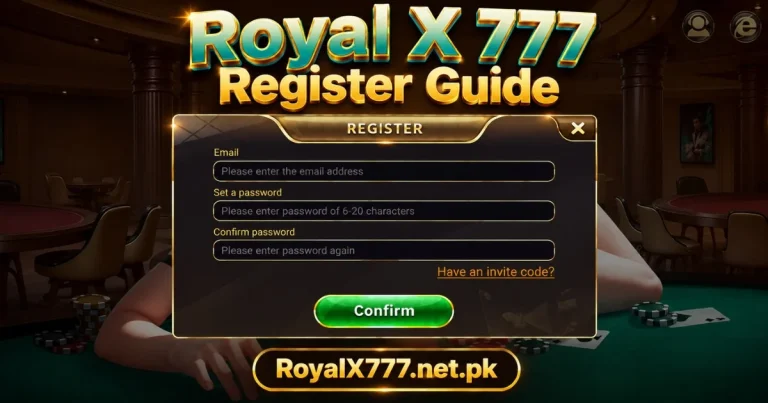
Step-by-Step: Filling Out the Registration Form
Mobile Number / Email
Your phone number is the required field and becomes your primary login credential. Email is optional at this stage and can be added later.
Creating a Strong Password
At least 8 characters, mixing uppercase, lowercase and numbers. Use something unique to Royal X 777 rather than reusing a password from JazzCash, EasyPaisa or any other account.
Confirming Your Country/Currency (If Applicable)
Some registration flows ask you to confirm your country and default currency — PKR for Pakistani players. Double-check this is set correctly, since it affects how amounts display throughout the platform.
Accepting Terms, Privacy Policy & Responsible Gaming Rules
You’ll need to accept the platform’s terms of service, privacy policy and responsible gaming acknowledgment before the Register button activates. Reading through these — even briefly — is worth doing, since they cover bonus conditions and account rules referenced throughout the platform.
OTP Verification — Completing Sign-Up
After entering your details, an OTP is sent by SMS to confirm the number you registered actually belongs to you. It typically arrives within 30 to 60 seconds and stays valid for a few minutes — enter it promptly, since letting it expire means requesting a new one and starting that step again.
Using a Referral / Invite Code During Registration
Where to Find a Valid Code
Referral codes typically come from an existing player — a friend, family member or someone in a gaming group who’s already registered. Codes shared through the platform’s official channels are also valid; codes from unofficial sources should be treated with caution.
How It Affects Your Welcome Bonus
Entering a valid referral code during registration can improve your welcome bonus terms and credits the referring player once you make your first deposit. Neither of these applies if the code isn’t entered at the right moment.
Why It Can’t Be Added After Registration
The referral field exists only during the registration form itself. Once your account is created, there’s no way to link a code to it retroactively — this is the single most commonly missed detail in the entire sign-up process, and worth double-checking before you tap Register if someone referred you.
What Happens After You Register — Claiming Your Welcome Bonus
Immediately after registering, go to the Promotions section before doing anything else. The welcome bonus is available at this point — some versions credit it automatically, others require a manual claim. Checking this before your first deposit matters, since a first deposit match bonus can also be affected by timing relative to current promotions.
This is also the right moment to submit CNIC verification in account settings and set a withdrawal password — both required before your first withdrawal, and far easier to sort out now than later when you actually have winnings waiting.
One Account Per Person — Why Multiple Accounts Get Suspended
Royal X 777 permits one account per person. Creating additional accounts — whether to claim multiple welcome bonuses, work around a limit, or for any other reason — violates platform terms and typically results in all linked accounts being suspended, including forfeiture of any balance held across them.
If you’ve registered before and forgotten, use Forgot Password on the login screen rather than creating a new account — this confirms whether an existing account under your number is still active.
Common Registration Problems and Fixes
OTP Not Arriving
Wait a full minute before requesting another. Check signal strength, confirm your SMS inbox isn’t full, and try switching between mobile data and Wi-Fi.
“Number Already Registered” Errors
An account already exists under that number. Try Forgot Password on the login screen — if it’s genuinely your account, a reset OTP confirms it.
Weak Signal / SMS Delays
Poor signal is the most common reason OTPs take longer than expected. Moving to an area with better coverage or switching between mobile data and Wi-Fi often resolves this within a minute or two.
Invalid or Expired Referral Code
Referral codes can expire or become invalid if the referring account is no longer active. Double-check the code was typed correctly; if it still doesn’t work, proceed without it rather than getting stuck on the registration form.
Registration Button Not Responding
Every required field needs to be filled, and terms need to be accepted, before this activates. Check your password meets the minimum length and your connection is stable.
Registration Safety Tips
Using Your Own Active SIM, Not a Temporary Number
Register with a SIM you actually control long-term, not a temporary or borrowed number. Losing access to your registered number later complicates password resets and account recovery significantly.
Choosing a Strong, Unique Password
A password specific to Royal X 777, not reused elsewhere — this alone prevents most account compromises stemming from breaches on unrelated services.
Verifying You’re on the Official Royal X Site/App (Avoiding Clone Sites)
Fake registration pages designed to look identical to the real site occasionally surface through search results or shared links, built to capture whatever details you enter. Type the official website http://royalx777.net.pk/ directly into your browser rather than clicking a link from a message or search result.
Never Paying to “Activate” an Account
Registration is free. Anyone claiming you need to pay a fee to activate, verify or unlock your new account is running a scam — legitimate registration never requires payment at any point.
Is Identity Verification (KYC) Required at Registration?
No. Registration itself only requires a mobile number, password and OTP verification — no CNIC or identity documents at this stage. KYC verification becomes necessary later, specifically before your first withdrawal, so submitting it in account settings shortly after registering (rather than waiting until you need it) is the practical move.
What to Do Next — Logging In and Making Your First Deposit
Once registered, log in to confirm your credentials work correctly across whichever device you plan to use regularly. Check Promotions for your welcome bonus, submit CNIC verification, and set a withdrawal password in account security settings.
Before making a larger deposit, consider a small test transaction — the minimum deposit through JazzCash or EasyPaisa, followed by a small test withdrawal once eligible. This confirms your entire account setup works correctly before committing more money.
Registering as a New Player vs Registering as a Referral
The registration form itself is identical whether you’re signing up cold or through a friend’s referral link — the only difference is that one field, the referral code, which only matters if it’s actually filled in. Players who arrive through a shared link sometimes assume the code applies automatically just by using that link, which isn’t always the case depending on how the link was shared.
If you’re registering because someone specifically told you about Royal X 777 and gave you a code, confirm the code field on the form is populated before submitting — don’t assume a link alone guarantees it’s applied. When in doubt, ask whoever referred you to confirm their code and enter it manually.
Registering on Behalf of Someone Else
Each account must belong to and be used by the person whose details are registered — creating an account using your own number but intending it for someone else’s use, or vice versa, creates complications around identity verification and withdrawal name matching down the line. If you’re helping a family member get started, it’s better to walk them through registering with their own number than to register on their behalf using yours.
How Long Does the Whole Process Actually Take?
Start to finish — opening the app, filling in the form, waiting for the OTP, entering it — registration on Royal X 777 takes about 60 to 90 seconds under normal conditions. The only variable that meaningfully extends this is OTP delivery time, which occasionally stretches to a minute or two on a congested network. Everything else, including the platform’s own account creation, happens near-instantly once the form is submitted.
Registration Field Requirements at a Glance
| Field | Required? | Notes |
| Mobile Number | Yes | Primary login credential |
| Password | Yes | 8+ characters, letters and numbers |
| OTP | Yes | Sent via SMS, expires within minutes |
| No | Optional, useful for account recovery | |
| Referral Code | No | Optional, but only works if entered now |
| CNIC/KYC | No | Not required at registration — needed before first withdrawal |
Conclusion
Registering on Royal X 777 takes under a minute on any device — phone number, password, OTP, done. The details that actually matter happen around that core process: entering a referral code at the right moment if you have one, checking Promotions before your first deposit, and setting up CNIC verification and a withdrawal password early rather than later.
Get those right from the start and everything downstream — bonuses, deposits, withdrawals — runs considerably smoother than it does for players who skip straight to the games and sort out the account basics only when something goes wrong.