Getting money into Royal X 777 sounds like the simple part — until a deposit doesn’t reflect, or a crypto transfer goes out on the wrong network and the funds don’t show up at all. Every deposit method on the platform has its own specific process, its own processing time, and its own way of going wrong if a detail gets missed.
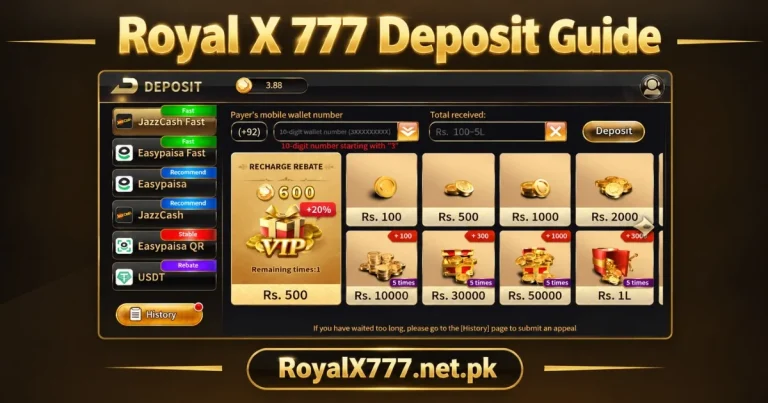
This guide walks through every supported deposit method in full — JazzCash, EasyPaisa, USDT and bank transfer — with exact steps, current limits, how the first deposit bonus works, and the safety habits that prevent the most common deposit problems Pakistani players actually run into.
What Is Royal X 777?
Royal X 777, also known as Royal X Casino, is a real-money gaming platform offering card games, slots, live casino tables, crash games, fishing games and sports betting to players across Pakistan. What sets it apart on the payment side is the range of deposit options — most competing platforms stick to JazzCash and EasyPaisa only, while Royal X Casino adds USDT and bank transfer, giving players more flexibility in how they move money in.
Supported Deposit Methods on Royal X 777
JazzCash
Pakistan’s most widely used mobile wallet, and the fastest deposit method on the platform — transfers typically credit within seconds to a minute.
EasyPaisa
Functionally identical to JazzCash in speed and process — use whichever wallet you already have funds sitting in.
USDT (Crypto) via TRC20/BEP20
For players who prefer crypto or want to move larger amounts without mobile wallet limits, Royal X 777 accepts USDT on two specific networks — TRC20 and BEP20. Network selection is critical here and is covered in detail further down.
Bank Transfer
Suited to larger deposits or players without a mobile wallet, moving money directly from a bank account. Slower than the mobile wallet options but handles bigger amounts comfortably.
Minimum and Maximum Deposit Limits
| Method | Minimum | Maximum Per Transaction |
| JazzCash | Rs 100 | Rs 25,000 |
| EasyPaisa | Rs 100 | Rs 25,000 |
| USDT | Equivalent of ~$5 | No fixed cap |
| Bank Transfer | Rs 500 | No fixed cap |
These figures are current as a general guide and can change — always check the exact minimum and maximum shown on screen for your selected method before depositing.
How to Deposit via JazzCash
Step-by-Step Mobile Wallet Deposit
Processing Time
Seconds to a minute for verified accounts. If the five-minute session window closes before you finish, the account number generated for that session stops working — start a fresh deposit request rather than reusing it.
How to Deposit via EasyPaisa
Step-by-Step Mobile Wallet Deposit
Processing Time
Identical speed to JazzCash — seconds to a minute. The only real difference between the two mobile wallets is which one you already have funds in.
How to Deposit via USDT (Crypto)
Setting Up a Compatible Wallet
You’ll need a crypto wallet that supports USDT on either the TRC20 or BEP20 network — Trust Wallet, Binance, or any similar exchange or wallet app that shows both network options when sending USDT.
Choosing the Correct Network (TRC20 vs BEP20)
Royal X 777 supports both TRC20 (Tron network) and BEP20 (Binance Smart Chain) for USDT deposits. The deposit address the platform generates is specific to whichever network you select in the app — sending USDT to a TRC20 address using the BEP20 network, or vice versa, sends the funds to an address that can’t process them correctly.
Step-by-Step Crypto Deposit Process
- Open the app and go to Wallet, then Deposit.
- Select USDT as your method.
- Choose the network — TRC20 or BEP20 — matching what your wallet actually supports for this transaction.
- Copy the deposit address shown, or scan the QR code.
- Open your crypto wallet, select USDT, and choose Send.
- Paste the address, select the same network you chose in step 3, and enter the amount.
- Confirm the transaction and wait for network confirmation.
Why Network Selection Matters (Funds Lost on Wrong Network)
This is the single most costly mistake possible in the entire deposit process. Sending USDT on the wrong network — TRC20 funds sent via BEP20, or the reverse — typically results in the funds becoming unrecoverable, since the receiving address doesn’t recognise transactions from a different network. There’s no five-minute session to restart here; once a transaction confirms on the blockchain on the wrong network, reversing it usually isn’t possible.
Double-check the network selected in the app matches exactly what you choose when sending from your wallet — this single check prevents the most expensive deposit mistake on the entire platform.
How to Deposit via Bank Transfer
Step-by-Step Process
Processing Time vs Wallet/Crypto Methods
Bank transfer is the slowest of the four methods — typically minutes to a few hours during banking hours, and potentially until the next working day for weekend or evening transfers. Use JazzCash, EasyPaisa or USDT for anything time-sensitive, and reserve bank transfer for larger, planned deposits.
First Deposit Bonus and Deposit-Linked Promotions
How the Welcome/Match Bonus Applies
Your first-ever deposit on Royal X 777 can be matched up to 200%, depending on the current promotion. This applies once only, regardless of which method you use to deposit — check the Promotions section before your very first deposit, since the match percentage isn’t fixed and can be meaningfully better during festival periods.
Wagering Requirements to Know Before Depositing
Bonus credit from a deposit match typically carries a wagering requirement — a multiple of the bonus amount that needs to be wagered before it converts to withdrawable balance. Your own deposited funds never carry this restriction; it applies only to the bonus portion. Check the specific requirement in the Promotions section before assuming the full matched amount is immediately withdrawable.
For example, a Rs 1,000 deposit matched at 100% might come with a 5x wagering requirement on the Rs 1,000 bonus portion — meaning Rs 5,000 in total wagers needs to be placed before that bonus becomes withdrawable balance. Your original Rs 1,000 deposit remains withdrawable at any point regardless of wagering progress on the bonus. Understanding this distinction upfront prevents confusion later when checking why the full account balance isn’t immediately available to withdraw.
Comparing Deposit Methods
| Method | Speed | Fees | Minimum |
| JazzCash | Seconds–1 min | None | Rs 100 |
| EasyPaisa | Seconds–1 min | None | Rs 100 |
| USDT | Minutes (network dependent) | Network gas fee only | ~$5 equivalent |
| Bank Transfer | Minutes–hours | Possible bank fee | Rs 500 |
Common Deposit Problems and How to Fix Them
Payment Not Reflecting in Wallet
Wait three minutes first — busy networks cause occasional delays. Refresh your balance screen. Still nothing after five minutes? Check your JazzCash, EasyPaisa or bank app confirms the transfer as Successful, then contact support with your reference number if it did go through.
Wrong Account/Number Used
If you sent funds to an incorrect account number, contact support immediately with your transaction details. This is far easier to resolve quickly than after significant time has passed.
Deposit Sent but Balance Not Updated
Confirm the transfer actually completed on your payment method’s side, not just that you initiated it. If it’s confirmed successful but the Royal X 777 balance hasn’t moved after 10 minutes, contact support with your reference number and a screenshot.
Failed or Delayed Crypto Transactions
USDT transactions depend on blockchain network confirmation, which can occasionally take longer during network congestion. Check your wallet’s transaction history to confirm the transfer actually broadcast successfully before assuming something’s wrong — most delays resolve within 10 to 30 minutes.
Deposit Safety Tips
Using Only Official In-App Payment Details
Always use the account number, wallet address or bank details generated inside the app for that specific deposit session — never a number or address someone sends you separately, no matter how they claim to have gotten it.
Verifying Payment Account Before Every Transaction
Double-check the account number or wallet address matches exactly what the app displayed before confirming any transfer, especially for crypto deposits where a single wrong character sends funds somewhere unrecoverable.
Avoiding Third-Party “Agents” Offering to Deposit on Your Behalf
Anyone offering to deposit for you, top up your account faster, or handle a transaction through their own account is not a legitimate part of the process. This is a common scam pattern in Pakistani gaming communities — deposit only through your own account, directly into the details the app itself provides.
Screenshotting/Saving Transaction Receipts
Screenshot every deposit confirmation the moment it appears, before leaving the payment app. If a deposit doesn’t reflect, this reference is exactly what support needs to locate and credit the transaction manually.
How Deposits Connect to Withdrawals — Account Name Matching Rules
Your Royal X 777 account name should match the name on whichever payment method you use to deposit — JazzCash, EasyPaisa or bank account name all need to line up with your registered account details. This isn’t strictly enforced at deposit time the way it is for withdrawals, but a mismatch discovered later can hold up your first withdrawal request while it goes through manual review.
Confirming this alignment on day one — before your first deposit, not after your first withdrawal gets held — saves a genuinely frustrating delay later.
Which Deposit Method Should You Actually Use?
For everyday deposits — testing the platform, topping up before a session, claiming a time-sensitive bonus — JazzCash or EasyPaisa are the obvious choice. They’re instant, familiar, and carry zero network-selection risk. Bank transfer makes more sense for larger, planned deposits where you’re not in a hurry and want to move a bigger amount without hitting mobile wallet transaction caps.
USDT sits in its own category. It suits players who already hold crypto and want to move funds without converting to PKR first, or who are depositing amounts large enough that mobile wallet limits become inconvenient. It’s not inherently riskier than the other methods, but it does demand more attention to detail — specifically the network match — than a JazzCash transfer ever will.
Depositing for the First Time — A Practical Checklist
- Confirm your account name matches your payment method: Do this before depositing, not after a withdrawal gets held later
- Check Promotions for the current first deposit match: The percentage isn’t fixed and timing can genuinely change your starting balance
- Start with a smaller test amount: Especially true for USDT — confirm the process works correctly before sending a larger sum
- Save the transaction reference immediately: Screenshot it before navigating away from the payment app
Conclusion
Depositing into Royal X 777 is fast and straightforward through JazzCash or EasyPaisa, flexible through USDT for players who prefer crypto, and reliable for larger amounts through bank transfer. The one detail that genuinely matters more than any other across all four methods: for USDT specifically, matching the network exactly, every single time.
Check the Promotions section before your first deposit, use only the payment details generated inside the app, and keep a screenshot of every transaction. Those three habits, combined with getting the USDT network right, cover nearly every deposit problem Pakistani players actually run into on this platform.